

Cybersecurity for Law Firms and Accounting Firms — You Are Selling Trust. Don't Lose It.
When people hear “cybersecurity,” they think of banks, tech companies, or government agencies.
But now, a normal law firm or accounting firm is often a more attractive target.
Why?
Because you hold what attackers value most:
Identity documents
Financial records
Corporate secrets
Litigation strategies
Tax data
Contracts and M&A documents
In cybersecurity terms, you are a high value data custodian. Usually, there is no experienced IT team in law and accounting firms to guard all sensitive Personal Identifiable Information (PII).
You aren’t selling expertise. You are selling trust.
How can professional services firms comply with PDPA regulations without breaking the budget? Do you need a huge investment in enterprise security tools?
Not necessarily. It starts with doing the fundamentals correctly.
The Fundamentals (The FREE Approach)
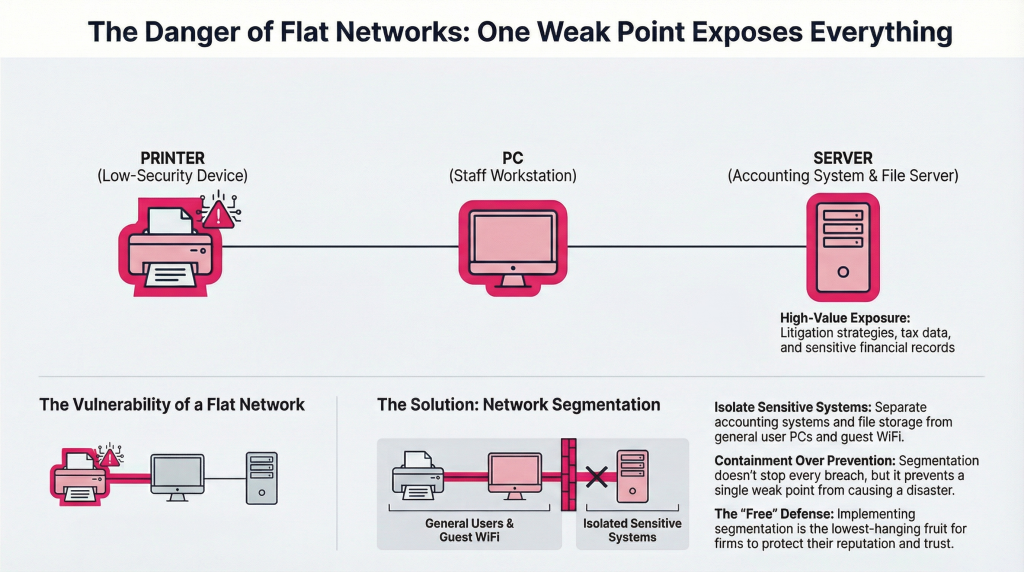
1. Network Segmentation
That means, staff PCs, file servers, guest WiFi, printers, and even accounting systems… all sit in the same network.
If the printer is compromised, lateral movement can easily reach accounting systems.
Network Segmentation separates:
Guest WiFi from the internal network
Accounting systems from general user PCs
Sensitive file storage from normal browsing devices
Segmentation does not prevent breaches, but it is the lowest-hanging fruit in any organisation to prevent disaster. (And it’s FREE!)
2. Label Your Documents + Role-Based Access Control (RBAC)
Start simple by labelling your documents (data classification) with:
Public
Internal
Restricted
Confidential
Example:
An intern can never access a Restricted document, they can only access Internal at best. HR admin can access HR policy labelled Internal but not equity contracts labelled Confidential.
Not every associate should access every client’s file. Not every accountant or lawyer should see all payroll records.
Identify which data matters most, before enforcing DLP software.
3. Encryption
Encrypting a document, whether a PDF, Excel, or Word file, restricts unauthorised access by requiring a password to open or edit the file. This can be done via Adobe Acrobat, online tools, or built-in features.
Use the “Protect” or “Encrypt” option with a strong password and choose 128-bit or 256-bit AES encryption for maximum security.
4. Other Basic Measures
Strong password policies (no admin123 or 88888888, please)
Multi-Factor Authentication (MFA) for email and cloud systems
With Some Investment
5. Secure Email
Business Email Compromise (BEC) is one of the most common attacks globally. Any attacker can gain access to a partner’s email account.
Implement DMARC, SPF and DKIM configuration to stop spoofed emails from impersonating your firm.
6. Encrypt Sensitive Data
All client documents should be encrypted. Encryption protects data when:
A laptop is stolen
A backup is accessed
A database is compromised
Files are intercepted
Two critical types:
Encryption at Rest — disk encryption on laptops, encrypted file servers, encrypted databases
Encryption in Transit — TLS email, secure VPN, HTTPS everywhere
Encryption ensures that even if access occurs, data is unreadable.
7. Data Loss Prevention (DLP)
Many firms jump directly to buying DLP software. DLP is always a useful investment, but before you write the cheque, understand what you are trying to protect and from whom.
DLP answers this question: “What happens if someone tries to send or copy sensitive data without authorisation?”
Example DLP policies:
Block sending NRIC numbers or passport data externally
Alert when a large volume of client documents is downloaded in a short period
Prevent upload of Restricted or Confidential files to personal cloud storage (Google Drive, Dropbox)
Block USB copy of restricted files from firm devices
DLP is especially important for:
Email — the most common exfiltration channel in professional services firms
Cloud storage — where files are silently synced outside firm control
Endpoint devices — where staff can copy files before resignation or compromise
For law and accounting firms, email DLP alone dramatically reduces exposure risk. A paralegal forwarding a Confidential M&A document to a personal Gmail account, intentionally or accidentally, is a PDPA breach. DLP stops it before it happens.
But DLP software has a limitation: it only addresses outbound data movement. It does not tell you who is moving laterally inside your network, accessing systems they should not be in, or quietly reading files they have no business role to access.
That is where monitoring becomes critical.
8. 24/7 IT Environment Monitoring — SIEM
DLP protects the exit door. SIEM watches everything that happens inside the building.
For a law firm or accounting firm that handles sensitive client data, financial records, and confidential strategies, your IT environment needs to be monitored 24/7, not just at the perimeter, but across every system, user account, and file access event inside your network.
Why it matters in a professional services context:
Consider these scenarios, all of which happen in real firms without anyone noticing:
A Finance executive downloads 2,000 client financial records at 11PM on a Friday
An intern accesses the vendor management system or client accounting platform they have no authorisation to use
A recently resigned associate logs in remotely and pulls case files before their access is revoked
A vendor with remote access connects at an unusual hour and begins exploring folders beyond the scope of their engagement
An attacker using a compromised staff credential moves quietly from a general staff PC toward the litigation strategy folder, lateral movement in progress
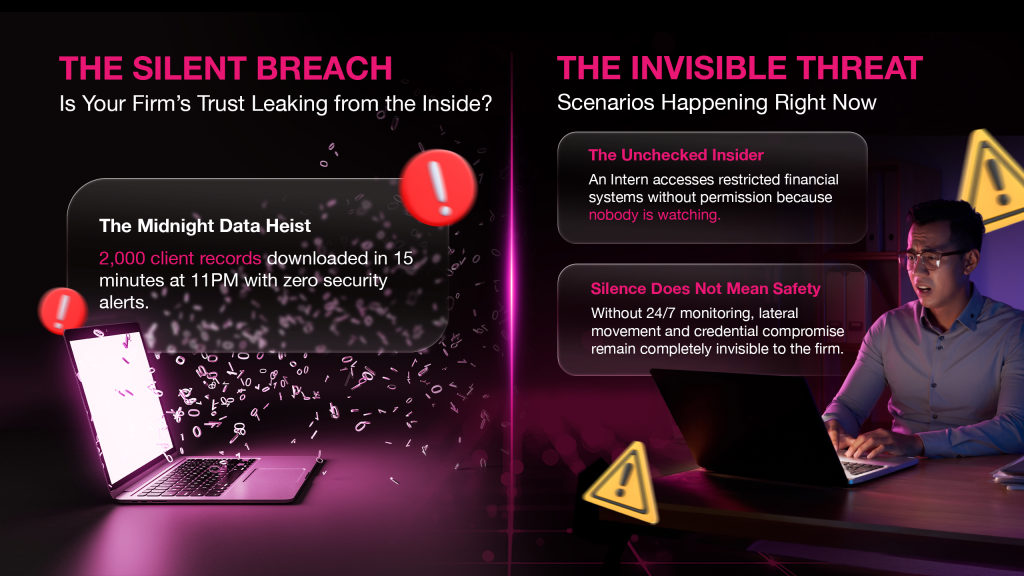
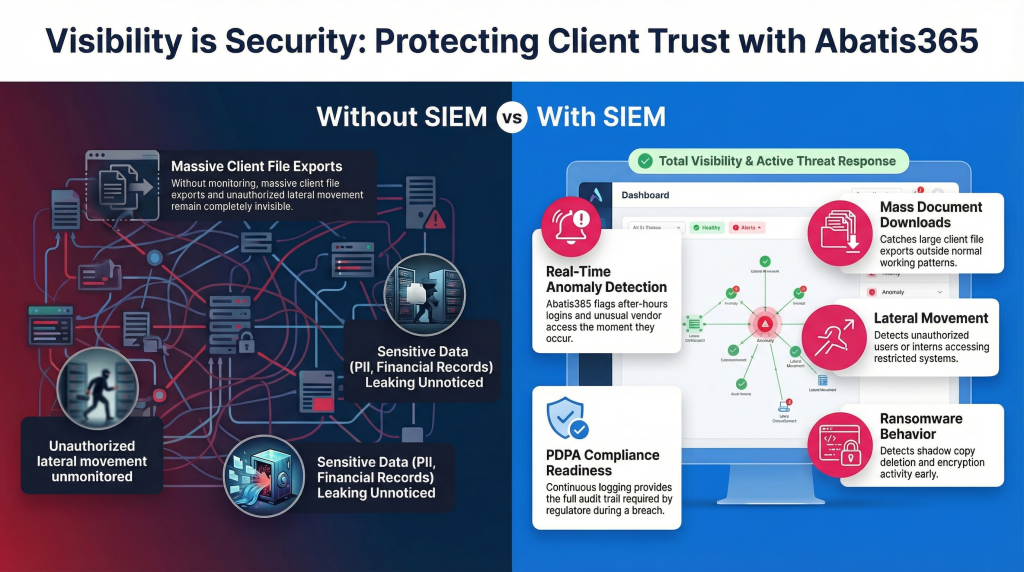
Without monitoring, none of these events generate an alert. They are invisible until a client calls, a regulator arrives, or the dark web listing appears.
With Abatis365, your firm gains real-time visibility across every user, system, and access event:
PDPA Compliance Is Not Optional
Under PDPA, you are legally required to:
Protect personal data from unauthorised access, disclosure, or misuse
Be able to demonstrate what data you hold, who accessed it, and when
Report data breaches within the required timeframe
Most law and accounting firms cannot currently answer any of these questions without manual reconstruction from scattered logs, if logs exist at all.
Abatis365 provides the continuous log monitoring and audit trail that turns PDPA compliance from a liability into a documented, defensible record.
Cybersecurity is not about buying expensive tools.
It is about building structured layers of protection:
Segment your network — stop lateral movement before it starts
Label your data and enforce RBAC — not everyone should access everything
Encrypt sensitive documents — at rest and in transit
Secure your email — DMARC, SPF, DKIM
Implement DLP — control what leaves your firm
Monitor your environment 24/7 with SIEM — see what is happening inside, not just at the perimeter
You are selling trust. 24/7 monitoring is how you protect it.
Want to know what’s currently happening, and what’s being missed, inside your firm’s network? Abatis365 provides centralised, 24/7 SIEM monitoring for law firms and accounting practices, protecting client data, ensuring PDPA compliance, and detecting threats before they become headlines. Let’s talk.